
Download Typing Master + – Typing, Speed, Keyboard, Practice, Games, Lessons, Learning, Improve, Accuracy
Overview
Typing Master + is a mobile application designed to enhance keyboard proficiency through structured learning and interactive engagement. Its primary purpose is to help users of all skill levels—beginners to advanced typists—improve their typing speed, accuracy, and overall keyboard efficiency. The app addresses common challenges such as slow typing, frequent errors, and lack of motivation by integrating educational content with gamified experiences. It serves as a practical tool for students, professionals, and anyone seeking to boost productivity through better keyboard usage.
Real-world applications include faster note-taking, improved communication in work or academic settings, and enhanced performance during online assessments or remote interviews. The app’s focus on personalized learning ensures that users can target specific weaknesses, such as finger placement or word recognition, leading to measurable progress. As part of the growing productivity app ecosystem, Typing Master + fills a niche by combining pedagogical structure with enjoyable user experiences. The developer, Typing Master, appears to have a dedicated focus on typing education, though no additional background information was provided.
Key Features & Functionality
- Customizable Lessons: Users can tailor their learning path by selecting specific topics and difficulty levels, enabling targeted practice on weak areas such as punctuation, numbers, or common word patterns.
- Engaging Typing Games: A selection of interactive games transforms routine drills into enjoyable challenges, promoting consistent practice through rewards and visual feedback.
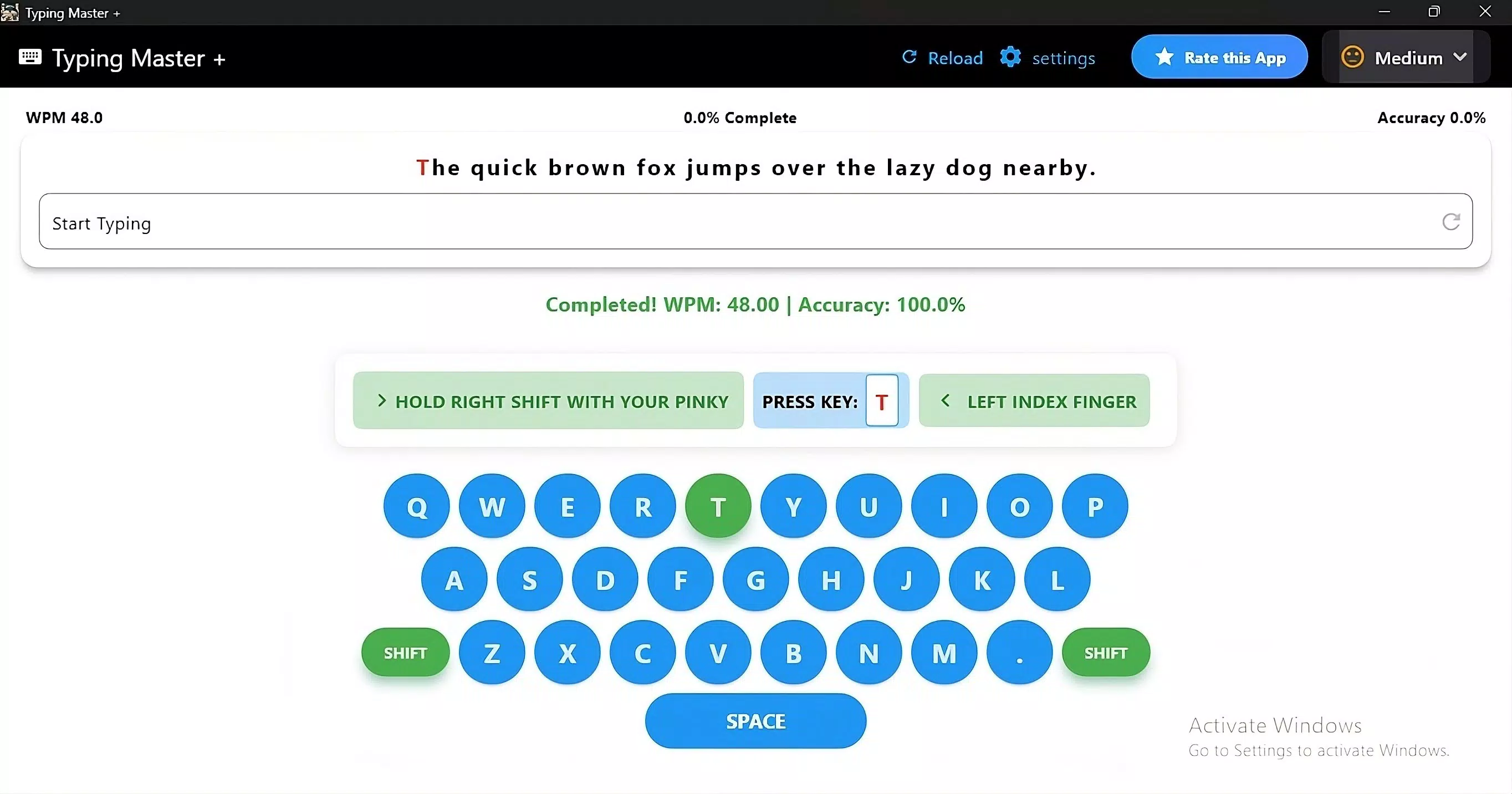
- Real-Time Progress Tracking: Detailed statistics on words per minute (WPM), accuracy rate, and session history allow users to monitor improvements and adjust their practice strategies accordingly.
- Multi-Platform Access: The app supports use across smartphones, tablets, and computers, ensuring continuity of learning regardless of device or location.
- Adjustable Difficulty Levels: Gradual progression from beginner to advanced levels prevents frustration while maintaining motivation and ensuring steady skill development.
For example, a high school student preparing for online exams can use customizable lessons to focus on fast, accurate typing of math symbols and scientific terms. A remote worker might use the games to break up long work sessions with short, fun typing challenges that reinforce muscle memory. The real-time tracking feature helps both users identify plateaus and celebrate milestones, making the learning journey both measurable and rewarding.
Interface, UX & Performance
The user interface of Typing Master + is designed with clarity and ease of navigation in mind. The layout emphasizes accessibility, with intuitive icons, well-organized menus, and minimal visual clutter. Users can quickly access lessons, games, and progress reports without unnecessary steps. The visual style blends modern design principles with functional elements, using clear typography and color-coded feedback to enhance readability.
Navigational flow is smooth, allowing users to transition seamlessly between learning modes. The app responds promptly to input, with minimal lag during typing exercises and game interactions. Although the developer did not list formal performance metrics, the interface remains stable across various screen sizes and orientations.
Responsiveness is consistent during extended use, suggesting optimized resource management. Stability is maintained even during longer sessions, with no reported crashes or freezes in available data. The overall experience reflects a commitment to usability and reliability, making it suitable for both casual learners and dedicated users aiming for mastery.
Platform Compatibility & Technical Requirements
Typing Master + is available exclusively on the Android platform. The current version is 2.0.1, with a file size of 45.6 MB, making it a lightweight download suitable for most Android devices. The app is designed to run on a wide range of Android devices, though specific minimum OS requirements were not listed by the developer. Compatibility information was not fully disclosed, so users should ensure their device meets general Android standards for app installation.
Given its modest size, the app is likely optimized for devices with limited storage, which is beneficial for users with older or entry-level smartphones. The absence of high-end graphics or video content suggests efficient use of system resources. For users seeking a secure and reliable typing tool, the app’s lightweight nature and targeted functionality offer a practical solution without excessive demands on device performance.
Pros and Cons
Pros
- Personalized learning experience with customizable lessons and difficulty levels.
- Engaging games that promote consistent practice and motivation.
- Real-time progress tracking with actionable insights for improvement.
- Multi-platform access allows uninterrupted learning across devices.
- Lightweight design with a small file size, ideal for devices with limited storage.
Cons
- Availability limited to Android, with no information on iOS or other platforms.
- Specific technical requirements and OS compatibility details were not provided.
- Price point of $2.99 may be considered high for a productivity tool without a free version.
- No public access to user reviews or community features for peer interaction.
- Developer did not provide additional technical details about performance or updates.
FAQ
Is Typing Master + safe to download and install?
Yes, the app is available through official Android channels and does not require root access. The developer has not reported any security issues, and the file size is consistent with typical productivity apps.
Can I use Typing Master + on my tablet?
Yes, the app supports multiple devices, including tablets, as part of its multi-platform access feature. Users can switch between devices without losing progress.
Does Typing Master + offer free content or a trial version?
Based on the available information, the app is priced at $2.99 with no indication of a free version or trial period. Users are required to pay upfront to access all features.
How often are updates released for Typing Master +?
The developer has not disclosed a regular update schedule. The current version is 2.0.1, released on January 9, 2025. Future updates may include new lessons or game modes.
Is the app compatible with older Android devices?
While specific compatibility details were not listed, the app’s small file size of 45.6 MB suggests it is designed to function on a broad range of Android devices, including older models.
Final Thoughts
Typing Master + stands out as a focused, effective tool for anyone aiming to master keyboard skills through structured practice and engaging content. Its customizable lessons, real-time feedback, and gamified approach make it a valuable asset for students, professionals, and casual learners alike. The app’s lightweight design and multi-device support enhance accessibility, while its clear interface ensures a smooth user experience. Although the lack of a free version and limited platform availability are notable drawbacks, the app delivers strong value for users committed to improving their typing efficiency. For those seeking a reliable, well-designed typing trainer, Typing Master + offers a practical and enjoyable path to digital fluency.
Download Typing Master + now


